On this page
What changed
Apple’s October 5 announcement introduces new image and video placements for product page headers and search results, plus a central Asset Library. These visuals complement the screenshots and previews that already explain your app. App Store Connect also provides a preview tool for different devices, orientations and Dark Mode.
Apple’s design guidance places these new creatives on iOS 27 and iPadOS 27 or later. Do not assume every visitor sees the same presentation: your existing assets still matter for the rest of your audience.
The operational change is useful even before a test starts. You can prepare a seasonal message ahead of time, get the asset reviewed, and choose when to use it. That creates room for a planned experiment instead of a last-minute export.
Header and search creative have different jobs
A header meets someone who has reached your product page. A search asset meets someone deciding which result answers their query. Start with that difference before opening a design tool.
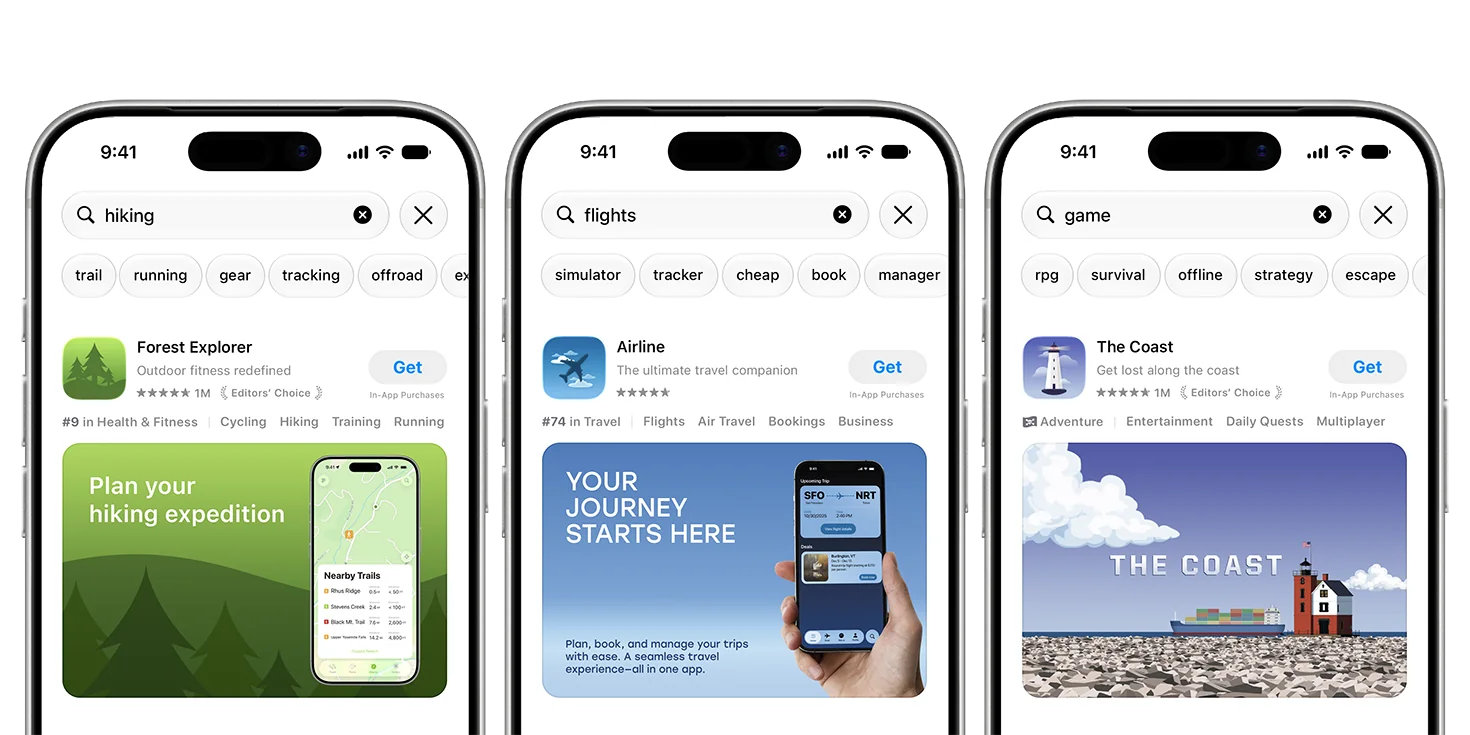
Forest Explorer highlights route planning, Airline the flight experience, and The Coast its game world. Each creative makes the app’s experience visible in the context of search. Image: Apple — App Store asset best practices.
| Placement | Question to answer | Creative hypothesis |
|---|---|---|
| Product page header | What is this app’s central promise? | A single recognizable benefit gives the rest of the page a clear context. |
| Search result | Does this solve what I searched for? | Showing the relevant feature makes the use case easier to recognize. |
| Apple Ads, when available | Does the ad’s promise continue after the tap? | The creative, destination page and in-app experience tell a consistent story. |
These are hypotheses, not measured outcomes from our apps. For a room-design app, for example, “see a different version of your room” is a useful brief. A visual of an actual room transformation can carry that message. Several unrelated features competing in one composition make it harder to decide what the asset is testing.
Prepare, preview and approve
Write a short brief first: placement, target market, audience intent, one message, asset owner, and the decision the test should support. Keep a control asset and version every export.
According to Apple’s specification table, checked October 7, 2026:
| Image export | Aspect ratio | Resolution | Format |
|---|---|---|---|
| Header | 21:9 | 3840 × 1646 px | JPEG or PNG |
| Search results | 3:2 | 1920 × 1280 to 3840 × 2560 px | JPEG or PNG |
| Universal, eligible for both | 16:9 | 5244 × 2950 px | PNG |
Images cannot include transparency. Header video uses 21:9; search video uses 3:2. Both run 5–30 seconds at 30 or 60 fps and accept MOV, M4V or MP4. Search video stays muted; product page video starts muted but can be unmuted. Make the message work without sound.
Use Apple’s templates to inspect the safe area. Preview the result in context, rather than judging the full-resolution export alone. A focal point or short phrase that looks good on a design canvas may be clipped or too small on a phone.
Asset Library management supports independent creative submissions and reuse of approved assets. Record the status and selected placement separately. Uploading a file is not approval; approval is not evidence that the intended presentation is live.
Localize the promise, not just the words
Start with one market where you understand the query and the app’s actual experience. Record the language, storefront, placement, message and destination together. A Turkish image paired with an English destination is a broken promise even when both files are valid.
Use a short phrase that fits at actual display size. Turkish text can grow or wrap differently from English; recheck the composition after translation. Preserve the same hypothesis across the language pair so you can explain what was changed. If the app lacks a feature in one market, change the brief before producing its creative.
For Apple Ads, the current help page still says coming soon. It permits preparation in App Store Connect now for later Today tab and search results use. It also describes a separate Apple Ads review and language requirements for creatives and destinations. Do not treat an App Store approval as campaign approval, or assume the App Store universal PNG is automatically a supported ad export.
Test one variable at a time
Choose the question first. “Does a room transformation communicate the benefit better than an isolated room image?” is narrower than “Does our new page work?”
- Keep the placement, language, message, destination and other page assets fixed.
- Change one visual treatment. Log exactly what differs from the control.
- Define the metric, observation window and stopping rule before you start.
- Record traffic mix and concurrent changes, including campaigns, prices and app releases.
- Use the platform’s supported experiment where available. Apple’s guidance mentions Product Page Optimization for alternate headers; verify the treatment options available to your app before scheduling.
- When comparing periods rather than randomized treatments, label the result observational.
For organic work, use the available App Store Connect product-page and download metrics. For paid work, when the feature becomes available, use Apple Ads impressions, taps, installs, spend and attribution settings. A higher tap-through rate does not by itself establish lower acquisition cost or better subscribers.
Do not prescribe “seven days is enough” for every app. A low-volume test may not support a decision. Report missing evidence as missing, keep an inconclusive result, and choose the next change from what the test can actually tell you.
Before you export: a practical checklist
- The visual shows one real benefit of the app.
- Placement and export specification are recorded.
- No unverified award, price incentive or misleading promise is embedded.
- Important text and artwork remain readable inside the safe area.
- Light, dark, device and orientation previews have been checked.
- Language, market and destination agree.
- The approval status and intended publication step are recorded separately.
- Control, treatment, metric and stopping rule are written down.
- Organic evidence and paid attribution will be reported separately.
A library full of files is not a creative strategy. The useful unit is a documented message, an approved asset, a matching destination and a test that can answer a specific question.
Frequently asked questions
Do creative assets replace screenshots?
No. They complement screenshots and app previews. Keep screenshots focused on the actual product experience.
Can I upload assets without a new app version?
Yes. Apple supports submitting creative assets through Asset Library independently of an app version. Approval and selecting where to use them are separate steps.
Can I use the new assets in Apple Ads today?
As checked on October 7, 2026, Apple Ads documentation still says coming soon. It says assets can be uploaded now for later use in Today tab and search results ads, with a separate advertising review.
Will a new header improve conversion?
That is a hypothesis to measure, not a promised result. Compare a defined treatment against a control and report the uncertainty, traffic mix and observation window.